Error: Something bad happened - when trying to import site from myKinsta

Q: Date/Time this occurred (Provide your time zone also)
3/5/2025 (UK)

Q: DevKinsta Version
Version 2.13.5 (2.13.5.9020)

Q: OS Version
A: MacOS 15.6.1 (24G90)

Q: Docker Desktop Version
A: 4.49.0 (208700)

Q: Were any error codes or messages observed? If so, what were they?
A: Something bad happened

Q: Detailed Description of the Problem
A: I cant pull any sites from myKinsta. I have removed and reinstalled devKinsta and docker several times and get the same error. I can share the log file privately if that helps.

Hi @wpcreative-jw

Welcome back! :slightly_smiling_face:

Can you try the steps in this thread:

If that doesn’t work, you can also try this:

If the issue still persists, please send me via DM the main.log file of Devkinsta.

Tried both solutions but not fixed, DMd you the log.

Thanks

Thanks for sharing the main.log file. The error that stands out is the following:

ERROR 1045 (28000): Access denied for user 'root'@'localhost' (using password: YES)

I also reviewed the site from Kinsta that you’re trying to pull, and I didn’t see any custom configuration on the site that could cause the pull action to fail.

Can you try one more time to delete all the DevKinsta containers, images, and volumes in the Docker Desktop? And this time, please also delete the contents inside this folder manually after.

  • User/Library/Application Support/DevKinsta (application config)

  • User/DevKinsta (site files)

Then after, reinstall Devkinsta and try to do the pull site action again.

Let me know how it goes!

Followed all these steps as I have done previously and still getting the same error. I have sent you the updated log. Please advise as this is becoming quite frustrating.

Thanks

This has been dragging on for days now and is severely impacting my work. Can someone speak to me on the live chat to get this sorted rather than 24hrs between replies. As a customer who pays over $300 a month quick support to get this resolved is the least I expect.

Hi @wpcreative-jw

After uninstalling both DevKinsta and Docker Desktop multiple times, I was able to replicate the same error you’re experiencing. I tried the previous suggestions, but unfortunately, they didn’t work for me either. I’ve now reported this issue to our DevKinsta development team, and I’m hopeful we can resolve it soon. I apologize for any inconvenience this may cause. We will keep you updated as soon as new information becomes available.

Looks like devKinsta software issue. Is there any fix.. Development has been stopped for the past 3days.

Hi @Seyed We’ve reported this issue to our DevKinsta development team and are waiting for further updates from their side. At the same time, we’re testing a potential workaround to address the issue in the meantime. We’ll make sure to keep you updated once we have more details.

Hello @wpcreative-jw :waving_hand: As discussed in our chat, I’m posting a complete step by step instructions, if needed in the future.

@Seyed My colleague and I gave you the steps in the other threads, but I wanted to tag you here as well.

Note: This applies to fixing the issues with site creation that are caused by database access error (in DevKinsta main.log, it’s → ERROR 1045 (28000): Access denied for user ‘root’@‘localhost’ (using password: YES) ).

Part ONE - RESETING ‘root’ USER PASSWORD

  1. Stop the devkinsta_db container

2. Once the container is stopped, open Terminal and run this command:

docker run --name devkinsta_reset_mariadb_root -v devkinsta_db_data:/var/lib/mysql/ -d mariadb:10.5.5 mysqld --skip-grant-tables

This should create a new container devkinsta_reset_mariadb_root.

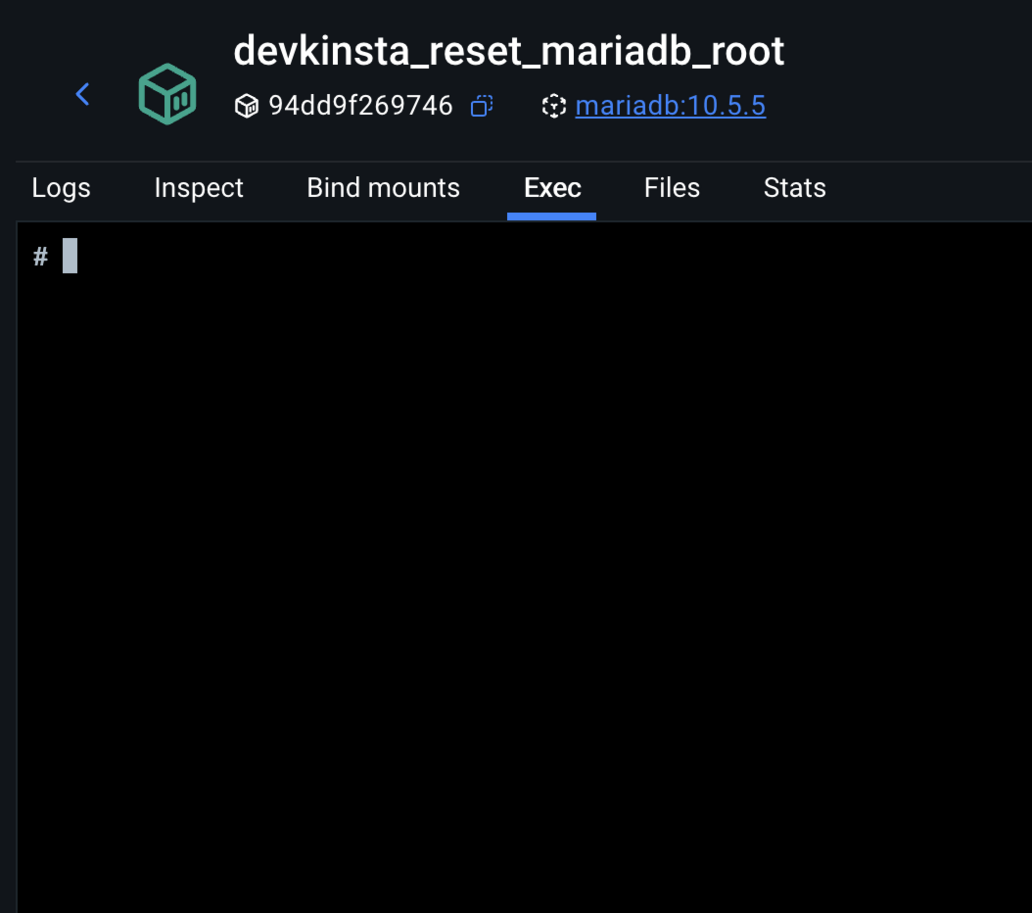
3. In Docker Desktop, click on the new container ‘devkinsta_reset_mariadb_root’.

4. Choose ‘Exec’

5. Run the following command: mysql -u root -p. It will prompt you for a password but just press Enter.

6. Run the following commands one by one:

USE mysql;
FLUSH PRIVILEGES;
ALTER USER 'root'@'localhost' IDENTIFIED BY 'ENTER_THE_NEW_PASS_HERE';
FLUSH PRIVILEGES;

Replace ENTER_THE_NEW_PASS_HERE with a password of your choosing and remember it/copy it for later use.

The above steps are resetting the passwrod for ‘root’ user.

  1. Switch back to Terminal. Delete the temporary Docker container by running the following in Terminal: docker rm devkinsta_reset_mariadb_root -f

  2. Start the original devkinsta_db container in Docker

At this point, the database error should be gone, but if it isn’t, complete the next set of steps as well.

Part two - GRANTING PRIVILEGES TO ‘root’ USER

Please execute the following commands from the Terminal one by one:

1. docker exec -it devkinsta_db bash

2. mysql -u root -p

(enter the password you created in previous set of steps)

3. GRANT ALL PRIVILEGES ON *.* TO ‘root’@‘%’ IDENTIFIED BY ‘the password you created’ WITH GRANT OPTION;

4. exit

5. exit

Part three - **UPDATING DevKinsta config.json
**
If you completed both sets of steps above and there was no change and the issue persists, you will need to check the password in config.json file.

Go to Finder → Go → Library → Application Support → DevKinsta. (If you don’t have ‘Library’ in Go (top bar), go to Finder, control-click anywhere in the directory and in Show View Options select “Show Library Folder”)

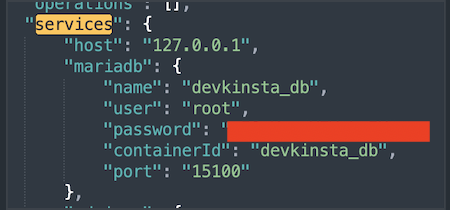
Once you are in DevKinsta directory, find config.json. Open it in any text editor that has ‘search’ feature. Search for ‘services’ and you should see a code like this:

Update that to a password that you have set in the first set of commands.

This should resolve the issue and allow both new site creation and pulling sites from Mykinsta.

Kind regards!

This is not working and made it even worse.

Hello Seyed :waving_hand:

Apologies for the back and forth. It’s possible there’s another issue, that some step was missed or not conducted properly, since the solution is complex. When I replicated the issue I had to run the full solution a few times before it worked.

Can you please send me the updated main.log from DevKinsta so I can recheck it and see if the error is the same? Many thanks.


:brain: Problem

On macOS (Apple silicon), DevKinsta fails when creating a new WordPress site.

Symptoms:

  • DevKinsta shows:

    • “Docker disk is almost full” (misleading)

    • Site creation fails after “Configuring NGINX”

  • Containers appear to be running normally (docker ps shows all services up)

  • Docker has plenty of disk space

Actual error from logs:

DevKinsta fails during the database step with:

Access denied for user 'root'@'localhost' (using password: YES)

This happens when it tries to:

  • CREATE DATABASE

  • and later DROP DATABASE

Example from logs:


:magnifying_glass_tilted_left: Root Cause

MariaDB inside the devkinsta_db container is in a broken authentication state:

  • The container sets a root password via:

    MYSQL_ROOT_PASSWORD=...
    
    
  • But MariaDB actually allows:

    • root login without a password
  • And rejects login with the password

So you get a mismatch:

What DevKinsta does What MariaDB expects
Uses password No password
→ Fails

This causes all DB operations to fail, which breaks site creation.


:white_check_mark: Solution

Fix the MariaDB root user to match the container’s expected password.


Step 1 — Get the expected password

docker inspect devkinsta_db --format '{{range .Config.Env}}{{println .}}{{end}}' | grep MYSQL_ROOT_PASSWORD


Step 2 — Confirm login mismatch

This fails:

docker exec devkinsta_db mysql -u root -p<password> -e "SELECT 1;"

But this works:

docker exec devkinsta_db mysql -u root -e "SELECT 1;"


Step 3 — Fix the root password

Run:

docker exec devkinsta_db mysql -u root -e "ALTER USER 'root'@'localhost' IDENTIFIED BY '<password>'; FLUSH PRIVILEGES;"


Step 4 — Verify fix

docker exec devkinsta_db mysql -u root -p<password> -e "SELECT 1;"

Should return:

1
1


Step 5 — Retry DevKinsta

Now creating a site works normally.


:warning: Important Notes

  • The “Docker disk is almost full” warning is misleading in this case

  • Docker storage was not actually the issue

  • The real issue is MariaDB auth mismatch inside the container


:light_bulb: Summary

This is a DevKinsta/MariaDB initialization bug where:

The root user is created without a password, but DevKinsta expects one.

Fixing the root password resolves the issue immediately.


Hello @zayne :waving_hand: Welcome to the Kinsta Community :tada:

I thank you for posting an alternative solution. We found that pretty much everyone was able to resolve this by following the steps above but it might be useful for anyone still having issues after that.

Thank you for taking the time to post this :slight_smile:

This looks like a DevKinsta bug, not something wrong on your setup. The root access denied error is coming from the internal MySQL container, and even Kinsta staff confirmed they can reproduce it.

At this point, best move is to stop retrying clean installs and use a workaround like pulling the site via backup download and importing manually into DevKinsta or using a local setup like LocalWP temporarily.

Also push for escalation via live chat since it’s already acknowledged as a dev-side issue.

Hi @Velysor Welcome to the Community!

Thanks for sharing your insights, we really appreciate it. In the meantime, using a workaround such as importing a backup manually or using another local environment is also an option or follow the workaround as also suggested by my colleague.

Just to clarify, DevKinsta support is handled through the community forum rather than live chat. We are here to assist you in every way we can.